Email marketing request
| 🔔 We’ve introduced a new Content Document to help partners more easily organize and submit their email content in one place, including subject line, preheader, header image, body copy, and event registration page. Please include a finalized Content Document either when submitting your request or send it to webreq@bu.edu at least 4 business days before your approved send date.
Download content document
📄 We’ve also refreshed our Broadcast Email Marketing Guidelines document (don’t worry, our process remains the same!) The document should clarify expectations, timelines, communication, approvals, and submission requirements. |
The Advancement Broadcast Email process is managed by the Engagement Communications (EngCom) team in collaboration with the Annual Giving and Development Communications (DevCom) teams. EngCom manages the email calendar, scheduling, deployment, and approval process for all general emails, while DevCom partners with requestors to develop content and build emails for those with VIP audiences. Questions about this form or the broadcast email process? Contact webreq@bu.edu—we’re happy to help.
You can choose between two core focuses for your email request:
- Alumni engagement-driven – Managed and built by the EngCom team.
- Donor/prospect-driven with a curated audience – Built by DevCom, specifically for donor-only audiences and VIP events coordinated through Danielle Luger’s team. Note that while DevCom builds these select emails, the EngCom team is still manages the schedule and deployment.
Frequently Asked Questions
Request questions
What type of email requests can I submit?
- We do not accept submissions for solicitations. For these requests, please contact the Annual Giving team directly.
- We do not accept email requests for Alumni Weekend. For related communications, please contact Hannah Gathman (hgathman@bu.edu).
How many resends can I request?
- General event email requests are allotted 1 send and 1 resend. Note: If your event is open to all alumni AND is on the events calendar, it may also be included in the bi-weekly all alumni newsletters, Alumni Digest and Bostonia. If you are looking for additional marketing, consider a social media paid ad.
- VIP event email requests are allotted 1 send and 2 resend (3 in total). Please note that DevCom builds and manages these emails, which do follow a slightly different process
- Newsletters are allotted 1 send per month.
Audience questions
Can I email alumni outside of my school/unit if I think content is relevant to them?
More is not always better, but if your event/opportunity is something that could have broad appeal, we can work with you.
Can I email students, faculty and/or staff via your services?
Yes, you can. Although it’s not always recommended. Your email should be specific to your target audience. Lumping in different types of constituents might dilute your message. However, if you would like to proceed with including any of these groups (i.e. students, faculty, and staff) please ensure that you are seeking
the required approvals.
Why didn't my email reach everyone I included in my audience list?
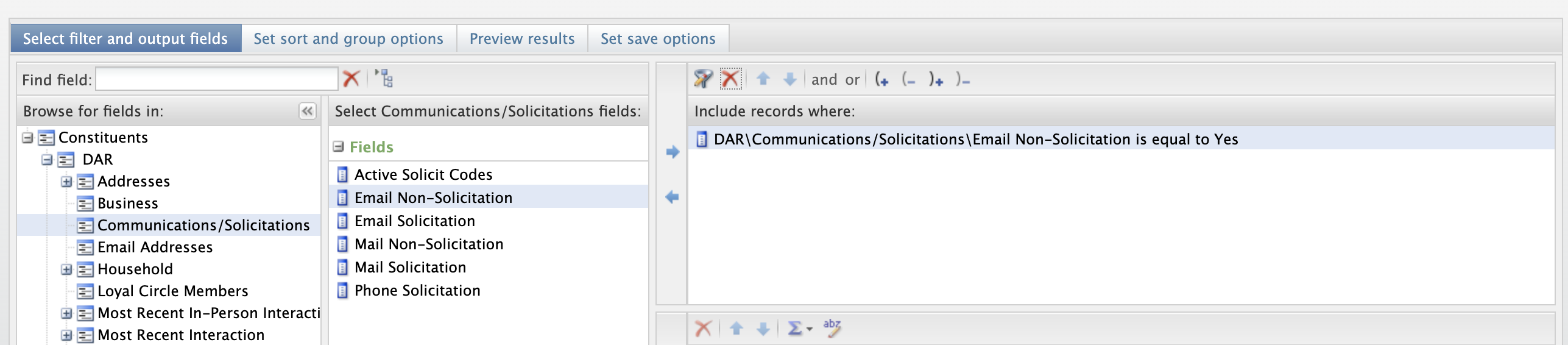
Make sure that when you are creating a broadcast email list, you are using the filters inside of BBEC that filter out those who have unsubscribed, marked BU as spam, or have bad or no email addresses for us to email.
Click to see screenshot.
What should be included in my audience file to send a broadcast email?
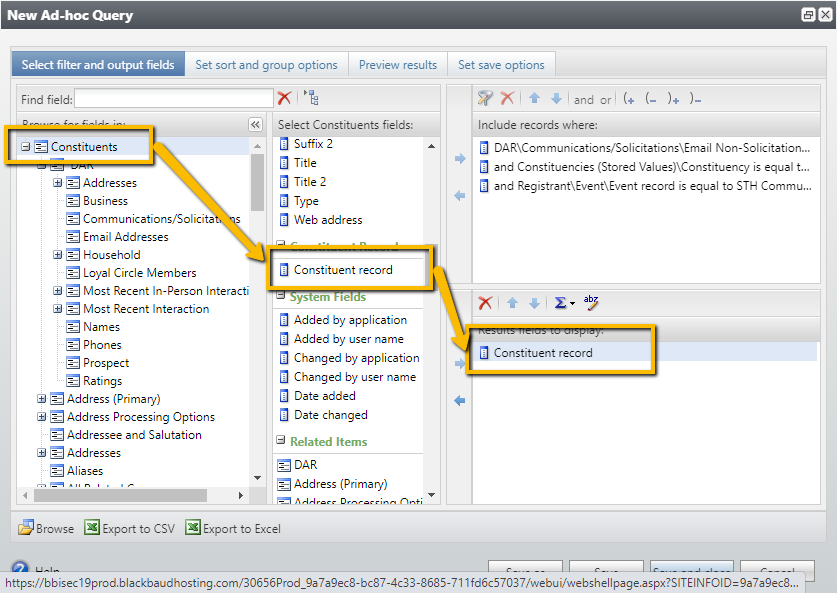
Just constituent record ID’s (aka GUIDs). You can find it in the constituent section of BBEC query called “Constituent Record”.
Click to view screenshot.
What do I do if someone is unsubscribed but wants to receive emails again?
Reach out to the Alumni Help Desk at
alumni@bu.edu to assist you in updating their record. If they marked BU as spam, they will require written express consent from the individual to remove the spam flag.
Can I forward an email?
We don’t recommend it. Email is very personalized to the consumer and can often break when it’s being forwarded (images won’t load, text will shift location, etc).
Image questions
I don't have a picture in mind, can you help?
Absolutely! We are more than happy to select a photo for you. If you have something in mind, but don’t have the means of finding it or downloading it on your own, just send us the example and we will do our best to find a similar photo.
Where can I download photos to use?
If you’re looking for something specific, you may source images from
BUAA Flickr,
Atlas, or Canva (
canva.com/photos). E
ngCom has a Canva Enterprise account and can purchase/license images.
Once you’ve selected your image, please send a direct link of the photo so EngCom can download and/or purchase the image and properly resize i. If you have images that your school/college/unit owns, please send them as an attachment in high-res.
Why should I avoid text on my image
Your email should not rely on the image. Instead, you should use an image to add decoration and emotion. Our email templates are designed to fit a small image for this reason. Additionally, if you want to include a logo, we can do that separately within the email.
Why can't my email just be one large image?
There are several reasons why you’d want to avoid this:
- If your subscriber has images turned off, they won’t see your email
- It won’t be accessible
- The size of the email can cause it to load slowly—or not at all
- Images may not scale well down to mobile screen sizes
- Your emails can land in the spam folder
- Your emails won’t be searchable
Reporting questions
Do you provide any email reporting?
We do! You can access the report
here. Note that EngCom updates each month’s tab at the beginning of the new month, but you can visit the dashboard whenever you need metrics (the shared link stays open!) To locate the performance for a specific message, go to the monthly tab → scroll down to Email Marketing Detailed Report section → look for your email by name. You’ll find unique opens, unique clicks, click rate, and more.
How do I measure the performance of an email?
Apple’s new Mail Privacy Protection (MPP) is having a significant impact on email marketing. Apple now pre-loads email data regardless of whether a user actually opened an email, meaning that open rates are becoming increasingly unreliable. For this reason, we highly recommend you focus on initial and total clicks, unsubscribes, and spam reports.
General questions
What is the CAN-SPAM Act?
When sending emails to alumni or others, please abide by the Federal Trade Commission’s rules and the
CAN-SPAM Act. If you have any additional questions beyond what is written below, please reach out to us at
webreq@bu.edu.
Why can’t I send a broadcast email using my personal Outlook account?
The CAN-SPAM Act, a law that sets the rules for commercial email, establishes certain requirements for commercial messages. Out of the many requirements, the right for recipients to unsubscribe is one of them. Mail merge emails sent from personal Outlook/Gmail accounts don’t allow the recipient to opt-out of the message.
What happens if I violate the CAN-SPAM Act?
There are both legal and financial repercussions to violating the CAN-SPAM Act. The University can be fined up to $46,517 per e-mail, with no maximum penalty.
When is it correct to use my Outlook email?
Any time you are doing a true 1:1 outreach. Sending large mail merge emails through your personal email will not only violate CAN-SPAM laws but will also hurt your email’s reputation.
Are there any guidelines to follow?
Federal Trade Commission has listed seven points outlined below. You can view them in full here.
- Don’t use false or misleading header information.
- Don’t use deceptive subject lines.
- Identify the message as an ad.
- Tell recipients where you’re located.
- Tell recipients how to opt-out of receiving future emails from you.
- Honor opt-out requests promptly.
- Monitor what others are doing on your behalf.
View the CAN-SPAM act
Please note: Anthology Encompass (our broadcast email marketing system) also adheres to EU’s General Data Protection Regulation (GDPR), Canada’s Anti-Spam Law (CASL), and other privacy laws around the world.
Can I send an email to alumni from another broadcast marketing tool?
No. Please read the CAN—SPAM Act tab above for more information.
Can I personalize information in an email?
Absolutely! We highly encourage you to personalize your email. Instead of “Dear alumni” you can personalize it to say “Dear Tim.”
What are the guidelines to sending an HTML email?
You must include the following tokens in your email footer. Note that they will automatically populate with the correct information, so please do not include a copy of the sender’s address (it will show up twice).
Required footer tokens
##Sender_Org##
##Sender_Address##
##Sender_City##
##Sender_State##
##Unsubscribe##
Optional recommended footer tokens
##Sender_Postal##
##Sender_Country##
##Webview##