Select applications installed on macOS and Windows computers managed by IS&T are updated via
asset management systems. This enables IS&T to more effectively meet the University's
Minimum Security Standards Policy.
macOS Application Updates
Updates to managed macOS applications will be installed within two weeks of their release. If the application is not running when an update becomes available, it will be installed silently for you in the background.
When an application that needs to be updated is running, Kandji will notify you daily of the pending update. You can also view pending updates and their deadlines by clicking the bee icon at the upper right of your screen. Clicking "Update" will guide you through closing the application before starting the update. Currently the deadline is set to 7 days after the release.
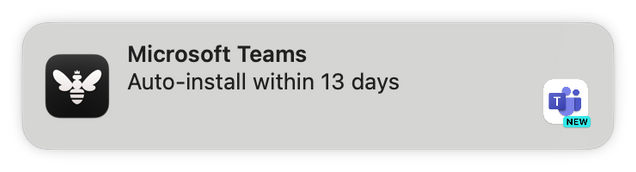
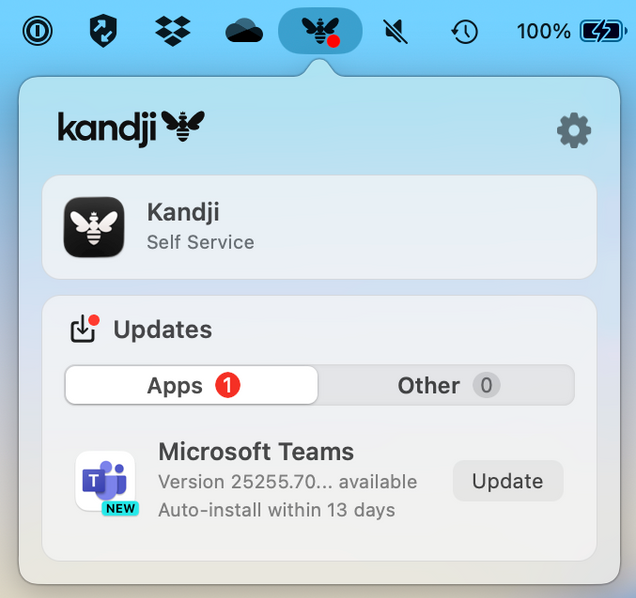
Once an update begins, you must wait for it to complete before using the application. Kandji will ask you to wait if you try to launch an application while its update is in progress.
Which applications are updated on macOS?
| Name |
Publisher |
| Adobe Acrobat Reader |
Adobe Systems, Inc. |
| Cisco Webex |
Citrix Systems, Inc. |
| Cyberduck |
iterate GmbH |
| DBeaver CE |
DBeaver Corporation |
| Dropbox |
Dropbox, Inc. |
| Firefox |
Mozilla Corporation |
| Google Chrome |
Google |
| Google Drive |
Google |
| Microsoft Edge |
Microsoft Corporation |
| Microsoft Excel |
Microsoft Corporation |
| Microsoft OneDrive |
Microsoft Corporation |
| Microsoft OneNote |
Microsoft Corporation |
| Microsoft Outlook |
Microsoft Corporation |
| Microsoft PowerPoint |
Microsoft Corporation |
| Microsoft Teams |
Microsoft Corporation |
| Microsoft Word |
Microsoft Corporation |
| PowerShell |
Microsoft Corporation |
| Thunderbird |
Mozilla Corporation |
| Visual Studio Code |
Microsoft Corporation |
| VLC |
VideoLAN Team |
| Windows App |
Microsoft Corporation |
| Zoom Client for Meetings |
Zoom Video Communications, Inc. |
What happens if an application is not updated by the deadline?
If the application is not running, it will update automatically in the background.
If the application is running, however, the Kandji menu will appear and warn you that the application will forcibly close and update within five minutes. You may delay the update by one hour at a time for up to one day.

How can I help ensure updates are installed?
We recommend finding opportunities during your normal day to quit managed applications. This might be when you aren't using an application, while taking a break, or at the end of the day. When an application isn't running, Kandji can update it for you in the background. Kandji checks-in every 15 minutes, so you may be able to resume using an application with a pending update fairly quickly after quitting it.
In most cases, clicking the red X in a window is not enough to quit the application. To quit, you can:
- Open the application's menu at the upper left of your screen and select the Quit option
- Right click the application's icon on your Dock and select Quit
- Use the Command (⌘) + Q keyboard shortcut to quit the active application
What about Mac App Store apps?
Mac App Store apps installed via Kandji receive automatic updates via the Mac App Store when they are closed. While Kandji will not impose a deadline or send you notifications, you can review when they updated by
opening the Updates section in Kandji Self Service.
These apps include:
- Apple Configurator
- Apple Pro Apps:
- Compressor
- Final Cut Pro
- Logic Pro
- MainStage
- Motion
- Garage Band
- iMovie
- Keynote
- Microsoft To Do
- Numbers
- Pages
- Slack
- Xcode
Windows Application Updates
Updates to managed Windows applications will be installed at different times depending on which department a computer is assigned to and how it is used:
|
HIPAA Covered Entities |
Non-HIPAA Entities |
Classroom/Computer Lab/Kiosks/Shared |
| When will updates run on my computer? |
Monday-Friday 8 AM
(2nd/4th weeks of the month) |
Monday-Friday 8 AM
(2nd/4th weeks of the month) |
Every other Saturday/Sunday 8 AM
(2nd/4th weeks of the month) |
| When will I need to restart? |
Computer will not restart |
| Will I see a notification?* |
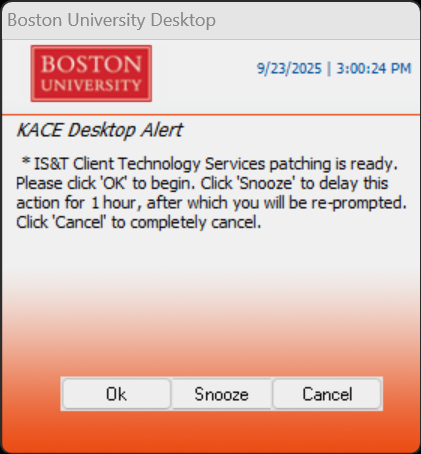
15 minutes before patching will start |
15 minutes before patching will start |
No notification |
| Can I snooze it? |
One 60 minute snooze |
Four 60 minute snoozes |
N/A |
When updates are available, a notification like the one below will appear at the lower right of your computer's primary display:
Google Chrome and Microsoft Edge
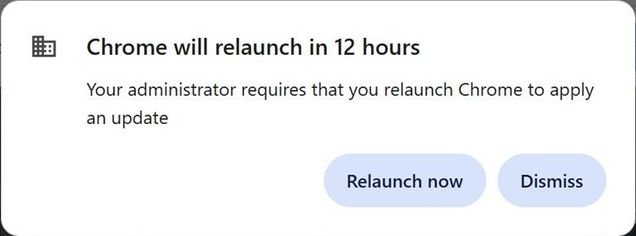
Google Chrome and Microsoft Edge have an additional update policy to force updates with-in 3 days of the release of the update from Google/Microsoft. This is done as web browsers are a primary attack vendor for malware. Also Google/Microsoft have recently increased their update cycle to two weeks. Below is a message that may be seen if a browser is not closed (the browsers should auto update when not in use).
Which applications are updated on Windows?
| Name |
Publisher |
| 7-Zip |
Igor Pavlov |
| Adobe Acrobat DC |
Adobe Systems, Inc. |
| Adobe Acrobat Reader DC |
Adobe Systems, Inc. |
| Audacity |
Audacity Team |
| Autodesk Licensing Service |
Autodesk, Inc. |
| Citrix Workspace App |
Citrix Systems, Inc. |
| draw.io |
JGraph |
| FileZilla |
Tim Kosse |
| GIMP |
The GIMP developer community |
| Git |
The Git Development Community |
| Google Chrome |
Google |
| Google Earth |
Google |
| iTunes |
Apple Computer, Inc. |
| Jabber |
Cisco Systems, Inc. |
| Jabra Direct |
GN Audio A/S |
| KeePass Password Safe |
Dominik Reichl |
| MySQL Workbench CE |
Oracle Corporation |
| Notepad++ |
Don HO |
| Omnissa Horizon Client |
Omnissa, LLC |
| Options |
Logitech, Inc. |
| Plantronics Hub |
Plantronics, Inc. |
| PostgreSQL |
The PostgreSQL Global Development Group |
| PuTTY |
Simon Tatham |
| Revu |
Bluebeam, Inc. |
| RStudio Desktop |
Posit Software, PBC |
| Semeru Runtime JRE |
IBM Corporation |
| Slack |
Slack Technologies |
| Tableau Desktop |
Tableau Software |
| TechSmith SnagIt |
TechSmith Corporation |
| Temurin JDK Hotspot |
Eclipse Foundation |
| VirtualBox |
Oracle Corporation |
| VLC Media Player |
VideoLAN Team |
| VMware Remote Console |
VMWare, Inc. |
| Webex App |
Cisco Systems, Inc. |
| Webex Meetings |
Cisco Systems, Inc. |
| WinSCP |
Martin Prikryl |
| Wireshark |
Wireshark Foundation |
| Zoom Outlook Plugin |
Zoom Video Communications, Inc. |
| Zoom Workplace |
Zoom Video Communications, Inc. |
| Zotero |
Corporation for Digital Scholarship |
Can I stop notifications from appearing on my Windows computer?
Notifications are displayed on all Windows computers with the exception of those installed in a classroom or computer lab, kiosks, and shared workstations. If you believe your computer is incorrectly categorized, please contact us and provide your computer name or asset tag number.
Can I schedule when an application updates?
While there is no option to run an ad-hoc update for all managed applications, you can use built-in update mechanisms present in many applications to update them ahead of schedule.
If you believe your computer is eligible to receive updates on weekends and may be incorrectly categorized, please contact us and provide your computer name or asset tag number.