What is Two-Factor Authentication?
Multi-factor authentication (MFA) adds a second layer of security to your online accounts. Verifying your identity using a second factor (like your phone or other mobile device) prevents anyone but you from logging in, even if they know your password.
How It Works

1. Enter username and password as usual
2. Use your registered device to verify your identity
3. Securely logged in
Once you've enrolled in Duo you're ready to go: You'll log in as usual with your username and password, and then use your device to verify that it's you. At BU, you can verify with Duo Push in the Duo Mobile app, a passcode generated by the Duo Mobile app, or a hardware security key.
Why Do I Need This?
Passwords are increasingly easy to compromise. They can often be stolen, guessed, or hacked — you might not even know someone is accessing your account.
Two-factor authentication adds a second layer of security, keeping your account secure even if your password is compromised. With Duo Push, you'll be alerted right away (on your phone) if someone is trying to log in as you.
This second factor of authentication is separate and independent from your username and password — Duo never sees your password.
Supported Devices
Click your device platform to learn more:
iOS phones and tablets
Android phones and tablets
Security Keys
Troubleshooting and frequently asked questions
Do I have to use Duo every time I log in to an online application at BU?
Yes and Duo allows you to remember a device for 30 days. You can approve any computer that you commonly use and will not be required to provide two-factor authentication confirmation until next month. For example, if you have a desktop and a laptop, you can approve both computers as trusted devices and not have to confirm your identity with a phone until the following month.
Can I set up Duo on more than one device?
Yes. You are encouraged to set up Duo on more than one device in case you forget or lose your phone. You can add as many devices as you like, such as a second smartphone, a tablet with the Duo Mobile app, or a hardware security key. When you log in, you can choose which device Duo sends the authentication request to.
What is the Manage Devices button? Can I use that to add more devices?
Yes, you can use the Manage Devices feature to add, remove, or change the devices that Duo can use to verify who you are. Note that, when an administrator adds your device, you will not need to go through the setup screen - we will send you the needed codes directly from Duo Security.
I have a new phone and the Duo app stopped working. What should I do?
If you get a new phone, even if the Duo app is restored from a cloud backup, it will lose its association with your account. Duo Push will not work on the new phone until it is reactivated.
You can reactivate your new phone with the Manage Devices option. First, verify your identity using another device enrolled in Duo, such as a second phone, a tablet, or a hardware security key. From Manage Devices, select your phone and choose Activate Duo Mobile (or Reactivate Duo Mobile). This will prompt you to scan a new QR code with the Duo app on your new phone. If you don't have another enrolled device, or have difficulties with this process, you can submit a ticket to the IT Help Center or call for immediate assistance - 617-353-4357.
Can I use the Duo app internationally?
The Duo smart phone app is designed to work internationally. If you install the app, it can generate the required code without need of either a telephone signal or data plan, and it can do this anywhere in the world. If you have a signal and data plan, the app makes two-factor authentication as easy as a pushing a single button, but if you don’t have one of those two things, you can use the app to generate a six digit code and enter that manually.
What happens if I set up my browser to clear cache/cookies after exiting?
The "Remember your device for 30 days" option uses a persistent cookie. If you clear cookies after you log off of the browser, the device will not be remembered and you will have to confirm your identity again when logging in.
What if I forget my phone at home?
You can contact the IT Help Center. They will verify your identity and provide a temporary passcode. We encourage you to then go into manage devices and add an additional phone.
Why am I seeing a blank DUO screen when using an iOS or macOS device when accessing a BU site requiring Single Sign On (SSO) Authentication?
Logging in with Duo requires that JavaScript is enabled
To resolve this issue:
- Make sure that JavaScript is enabled in Safari on your macOS or iOS device.
- If you have an MDM on the device, such as JAMF, please check to determine if the MDM settings could be preventing the Duo Prompt from displaying.
- Disable content restrictions on the device. The instructions are described below for different versions of iOS or macOS.
Disabling Content Restrictions
iOS 12 or newer
- Navigate to Settings > Screen Time > Content & Privacy Restrictions > Content Restrictions > Web Content.
- Uncheck Limit Adult Websites to completely disable content restrictions.
- If you do not want to fully disable content restrictions, you can allow duosecurity.com within the Content Restrictions page on the iOS device. This will allow the Duo Prompt to display even if content restrictions are enabled.
Note that if you are opening Screen Time for the first time and haven't set up the feature, you will be prompted to set up the phone either for yourself or a child and will have the option to set a passcode.
iOS 11 or older
- Go to Settings > General > Restrictions > Websites
- Uncheck Limit Adult Content to completely disable content restrictions.
macOS 10.15 (Catalina) or higher
- Open System Preferences
- Navigate to Screen Time > Preferences > Content & Privacy
- Set any Web Content restrictions to Unrestricted access
- If you do not want to fully disable content restrictions, you can allow duosecurity.com within the Content Restrictions page on the iOS device or to the Allowed Websites Only list on macOS. This will allow the Duo Prompt to display even if content restrictions are enabled.
After confirming a legitimate login attempt, I'm stuck on a strange two-step screen. Why?
Logging in with Duo requires that JavaScript is enabled. If it is not, your attempt to log in will fail and your screen will look like this:
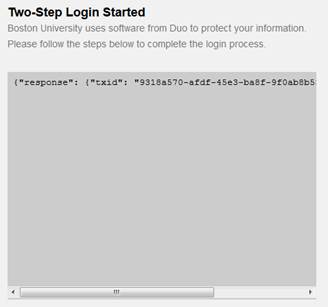
If you encounter this issue, disable any JavaScript blocking plugins or browser settings (or include an exception for scripts from duosecurity.com) and attempt to log in again.
What if I don’t have a data plan on my phone? What if I don’t have a connection?
The Duo smart phone app provides options that work without a data plan or even a connection, if necessary. The app can generate the required code without need of either a telephone signal or data plan, and it can do so anywhere in the world. If you have a signal and data plan, the app makes two-factor authentication as easy as a pushing a single button.
I am studying abroad this semester and don't have an international phone plan, can I still use Duo?
YES! Duo works internationally, don’t worry – Duo can work with or without cellular service or a wifi connection.
Even with cellular service disabled or without a wifi connection, you may use the Duo Mobile app to generate a passcode that you can use to authenticate. Simply choose the Enter a Passcode option when you get the Duo authentication prompt. To generate the passcode, open the Duo Mobile app on your phone or tablet and tap the button with the KEY symbol.
What happens if I forget my phone at home?
You can contact the IT Help Center. They will verify your identity and provide a temporary passcode. We encourage you to then go into manage devices and add an additional phone/device.
What if I lose my phone?
Contact the IT Help Center immediately and we will lock your Duo account to prevent malicious activity.
What if I don’t have a smartphone or cell phone?
If you don't have a smart phone, you can use security token as an alternative. For more information about hardware security keys and how to set them up, visit the Duo Webpage:
https://guide.duo.com/security-keys
You can also use a tablet to access Duo, or purchase a Yubikey.
What is a Yubikey and how does it work with Duo?
A Yubikey is a small hardware device (think USB stick) that supports two-factor authentication. A Yubikey can be plugged into your computer's USB port or "tapped" on your device (if supported) to verify your login. A Yubikey is another method you can use to access Duo! Yubikeys can be purchased from Amazon or directly from the Yubico.
What if I have an extenuating circumstance that doesn't allow me to use Duo?
Contact the IT Help Center and they will be able to help you find the best solution for accessing Duo two-factor.
About Duo and two-factor authentication
Am I required to use two-factor authentication?
Yes, everyone at the University is required to use Duo MFA.
I know how to avoid phishing email messages, why do I need to use this?
Unfortunately, experience has shown that people are not as good at recognizing malicious email as you might think. Every day, members of the BU community fall prey to these kinds of scams. We have to take steps to ensure that we are more than just a single click away from having our paycheck stolen or becoming a victim of identity theft.
Whom should I contact if I have questions or concerns about the requirement to use Duo?
We encourage you to contact us with feedback, or with questions or concerns about the project in general. The Vice President of Information Services & Technology and the Information Security & Business Continuity governance committee for IS&T can be reached directly at duo@bu.edu.
How will Duo use change how I log in to BUworks and other web services?
First, Duo will require a second method of confirmation for a person logging in to view or edit sensitive data. Individuals will be asked to confirm their identity using the Duo Mobile app, a hardware security key, or a secured kiosk (for certain staff).
The login screen you're used to seeing at [www.bu.edu/buworkscentral/](https://www.bu.edu/buworkscentral/) will change slightly. Also due to the transition, Web Login-secured applications, including those linked from BUworks Central, will require you to log in again. These other applications do share the same login credentials as many applications at BU, so logging in more than twice during a session is very unlikely.
More and more applications to be compatible with the high-security login process so that you'll be required to log in less often while using web applications.
Do I need a smart phone to use Duo?
If you're unable to use the Duo Mobile App (e.g., due to device compatibility issues), you can use security token as an alternative. For more information about hardware security keys and how to set them up, visit the Duo Webpage: https://guide.duo.com/security-keys