Select Courses to Create in Blackboard through MyBU
Each term you can choose to create a Blackboard course site for any of your course sections through MyBU.
After loading a Term in the app, choose "Create in Blackboard" (and "Ultra" if preferred) and click Save to request one or more courses. Courses you don't choose to "Create in Blackboard" will still be available to create the next time you open the app.
After submitting, your courses should be created in Blackboard within 6 hours.

Guided Tour
Step 1: Access the Tool
The tool is available through the MyBU sidebar.
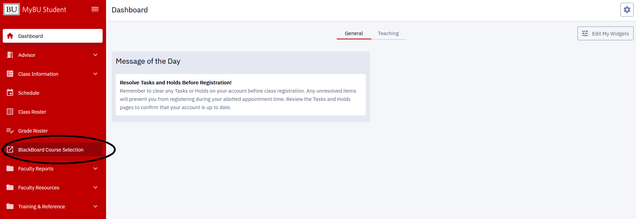
Step 2: Choose a Term and Load Courses
Choose a Term and then click the Load Courses button. If a course has already been submitted for the selected Term you won't be able to modify its options (contact IT Help for further requests with that course).

Step 3: Review Courses and Blackboard Options
When the Term is loaded you will see a table with a row for each of your courses and an option to create the course in Blackboard or not and whether that course should be in the Original view or the Ultra view.
By default "Do Not Create in Blackboard" is selected and you must choose "Create in Blackboard" on any row where a course site is needed. (Remember to choose "Use Ultra" if preferred for a course.)
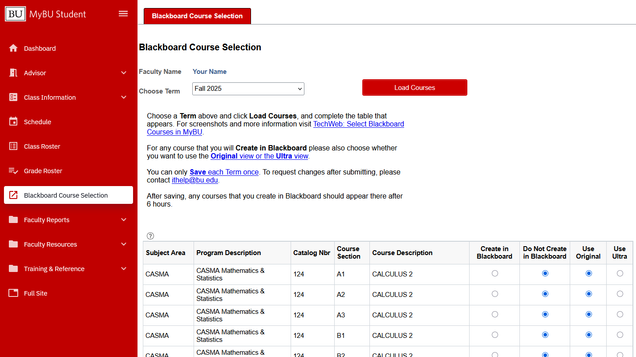
Step 4: Select Options for Any Rows
If you want a Blackboard Ultra course to be created, click both the "Create in Blackboard" option as well as the "Use Ultra" option.
After saving, courses you don't choose to "Create in Blackboard" will still be available to create the next time you open the app.
If a course is not editable it was already saved by another faculty member (teaching the same section) or an administrator. You can see their username and a timestamp of when it was saved to the right of the locked creation options.

Step 5: Click Save to Submit the Term
When you click "Save" courses you chose to "Create in Blackboard" will be locked. Remember to select "Use Ultra" (if preferred) for each course you are creating.
Courses you don't choose to "Create in Blackboard" will still be available to create the next time you open the app.

You will be prompted to confirm your submission.
Step 6: Review Courses in Blackboard
When you've confirmed the submission you will receive a confirmation message.

After 6 hours, please review your list of courses in Blackboard and ensure that the courses for the submitted Term have been created. For guides on accessing Blackboard and more information visit Blackboard Learn for Instructors on TechWeb.
Frequently Asked Questions
What's the difference between Original and Ultra?
BU currently supports Blackboard Learn in two formats: Original course view and Ultra course view. The Blackboard Ultra course view ("Blackboard Ultra" or simply, "Ultra") is the newer version with more accessible and mobile-friendly features. The whole university will need to be in Ultra course view by the end of December 2026.
In the Ultra Course View, workflows are simplified (fewer clicks), a modern look and feel, and a fully responsive interface on all devices. All course content now appears on the main page (Content tab). One of Ultra's key feature is the design, creation, and placement of content all happen on the same page called Course Content.
The Original Course View includes all of the traditional workflows and depth of functions Blackboard Learn is known for. The course menu appears on the left side of your window and is the cornerstone for the organization and navigation of your course. You create links on the course menu to present tools and materials to students.
For a video and more information visit Courses: Ultra vs Original on TechWeb.
How do I combine sections?
After clicking load classes, select Create in Blackboard and either Original or Ultra for each section on the Term you are submitting that you need in Blackboard. After clicking Save you should see these courses appear in Blackboard within 6 hours.
For the sections you would like combined, ask the IT Help Center to create a new course for groupings. This will have the section code beginning with "Z".
On Blackboard, any changes you make to the "Z" section will be visible to students enrolled in your other sections.
