Dean of Students Business Office (DOSBO)
About Us
Formerly the Student Activities Business Office (SABO), the Dean of Students’ Business Office (DOSBO) supports the financial and administrative needs of student organizations and university departments engaged in student programming. DOSBO acts as the central hub for processing payments, reimbursements, vendor contracts, purchasing, and travel for student-led initiatives. The office ensures compliance with university policies and helps student groups manage their allocated funds responsibly. In addition to financial services, DOSBO provides training, guidance, and oversight to promote transparency, accountability, and efficiency in the use of student activity fees. DOSBO works closely with the Student Leadership Impact Center (SLIC) to coordinate student organization purchases.
Who Can Access Our Services?
All student groups, that are recognized by the university and in good standing with the Student Leadership & Impact Center. If you have any special circumstances or requests, please book an appointment with us by contacting our email at sabo@bu.edu.
Helpful Guides & Documents
Terrier Central Officer Training Videos
**Make sure to click below to advance to the next video!
Check Pick-Up Information
If you are awaiting a reimbursement check from your student organization, look out for a notification email from sabo@bu.edu that your check is ready for pick-up. It can take anywhere from 3-5 business days for the check to be processed, longer during high volume seasons.
Visit our office in the GSU Basement Room B45 with your valid BU Student ID in order to retrieve your check. Once retrieved, cash out within 120 days to avoid check expiration.
Please note: We are not authorized to disburse your check to anyone other than the person listed on your check, unless you are physically unable to pick it up yourself. In that case, you may designate a family member by providing written permission via email.
Contact Information
For students who have any questions or concerns, please contact sabo@bu.edu.
Our physical office is located in the basement of the GSU, 775 Commonwealth Ave, Boston, MA in Room B45.
For vendors, please visit Guided Buying For Suppliers.
FAQs
Budget & Account Management
How do I check my student organization’s account balance?
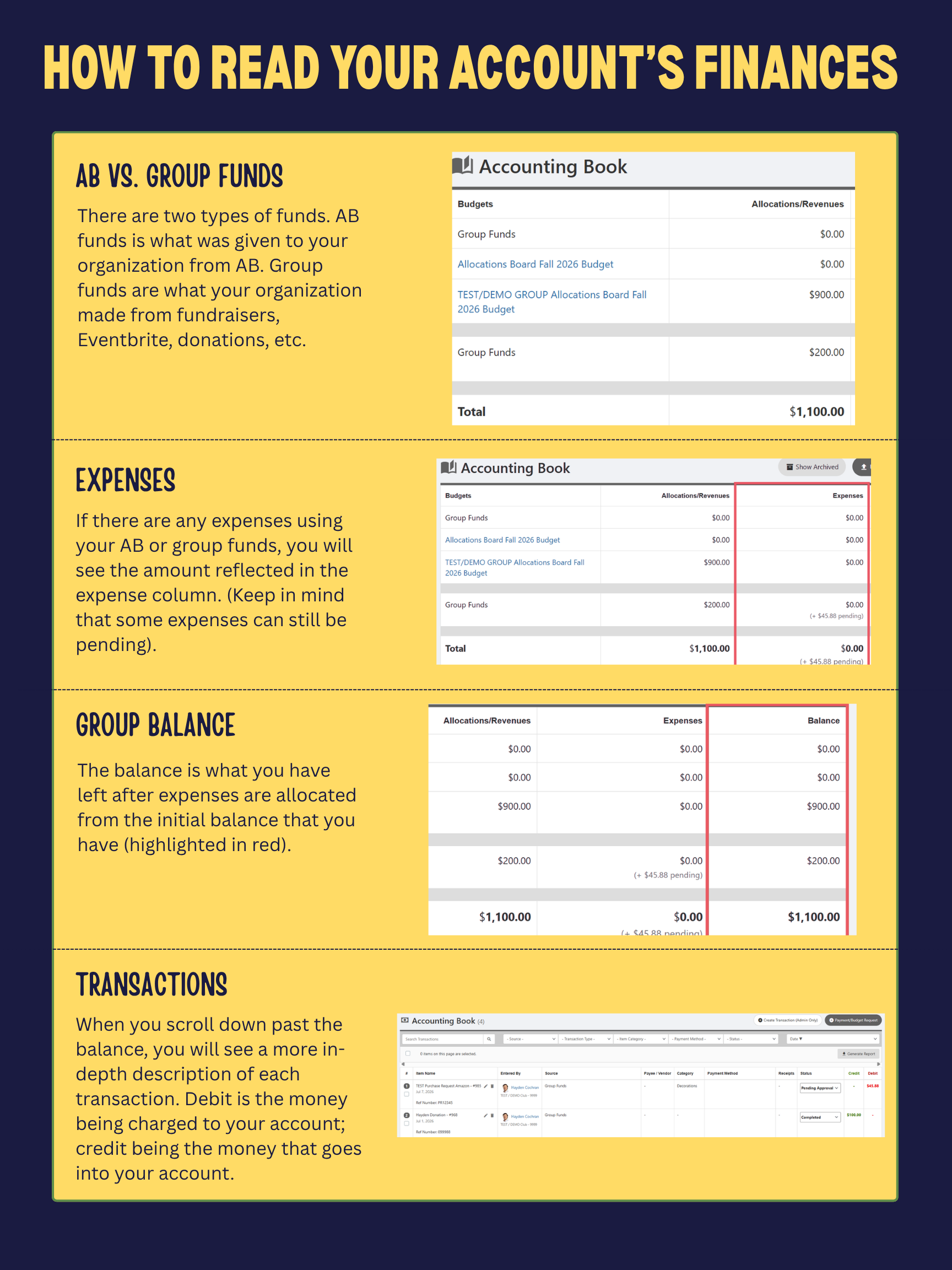
Login to your student organization’s Terrier Central account. From the top bar, access the group dashboard by selecting “Groups” and your desired group from the dropdown. Then, click “Accounting Book.” Alternatively, you can access the accounting book by clicking the “Money” dropdown in the sidebar.
Do funds roll over from year to year?
Group funds (collected from fundraising, donations, previous transfers, etc.) roll over from year to year. However, any unused funds granted by the Allocations Board (AB) will be swept up at the end of the year. This means any unused funds (that are not already a part of group funds) will be forfeited.
What happens if our account balance is negative?
If your account balance is negative, please make sure to have incoming funds deposited into your account to take out of deficit. You can write us a check (made out to Trustees of Boston University), and we can deposit the check for you. You can also do an online donation for your group. It is of great importance that you keep track of your finances to prevent this from happening as it can disrupt your budget approval with the Allocation Board.
Contracts
Who is authorized to sign contracts for my student organization?
Students are never allowed to sign. Depending on the scope, it will either be the Director of Student Leadership & Impact Center (SLIC) or BU Sourcing who will complete this as part of your PR submission.
When would I need a contract?
There are three main instances when student organizations need a contract:
- Your organization plans on paying a performer/entertainers
- You are renting a venue off campus
- You are bringing a vendor to campus who will provide a service to your organization
How far in advance do I need to submit a contract?
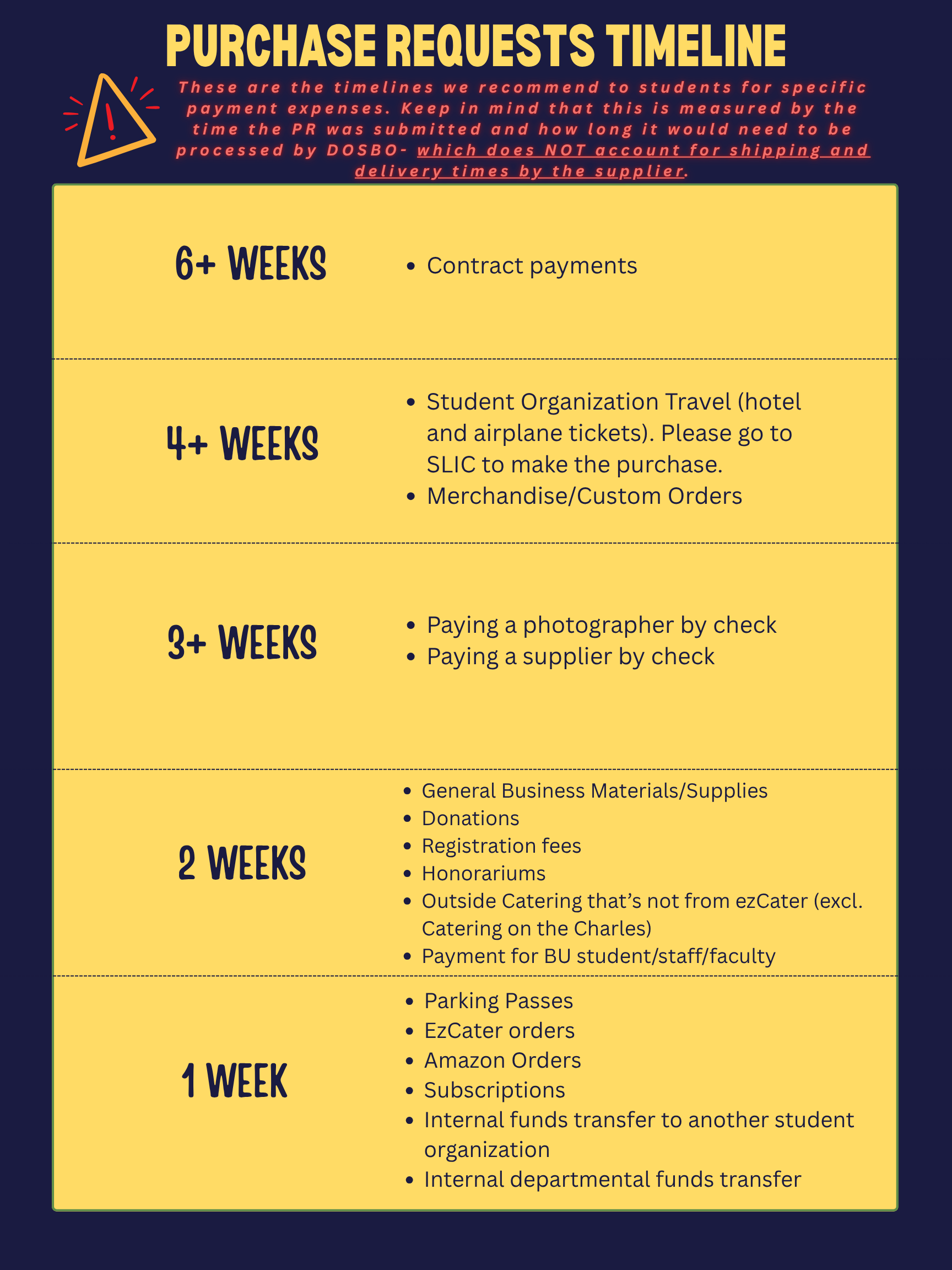
You should submit these 6-8 weeks in advance via your Event Request in Terrier Central.
Why does this process take so long?
The contracts process includes multiple departments on campus. Unfortunately, we are unable to speed up these parts of the processes.
How do contracted vendors get paid?
Once your event is over, you will need to submit a vendor payment request for all contracted vendors. Your service provider will not be paid without this step.
Fundraising & Deposits
I don't see my donations/Eventbrite revenue reflected in our account
Deposits are not real time. The funds are manually allocated, so this may take some time for you to see it reflected in your account.
How do I deposit cash or checks into my group’s account?
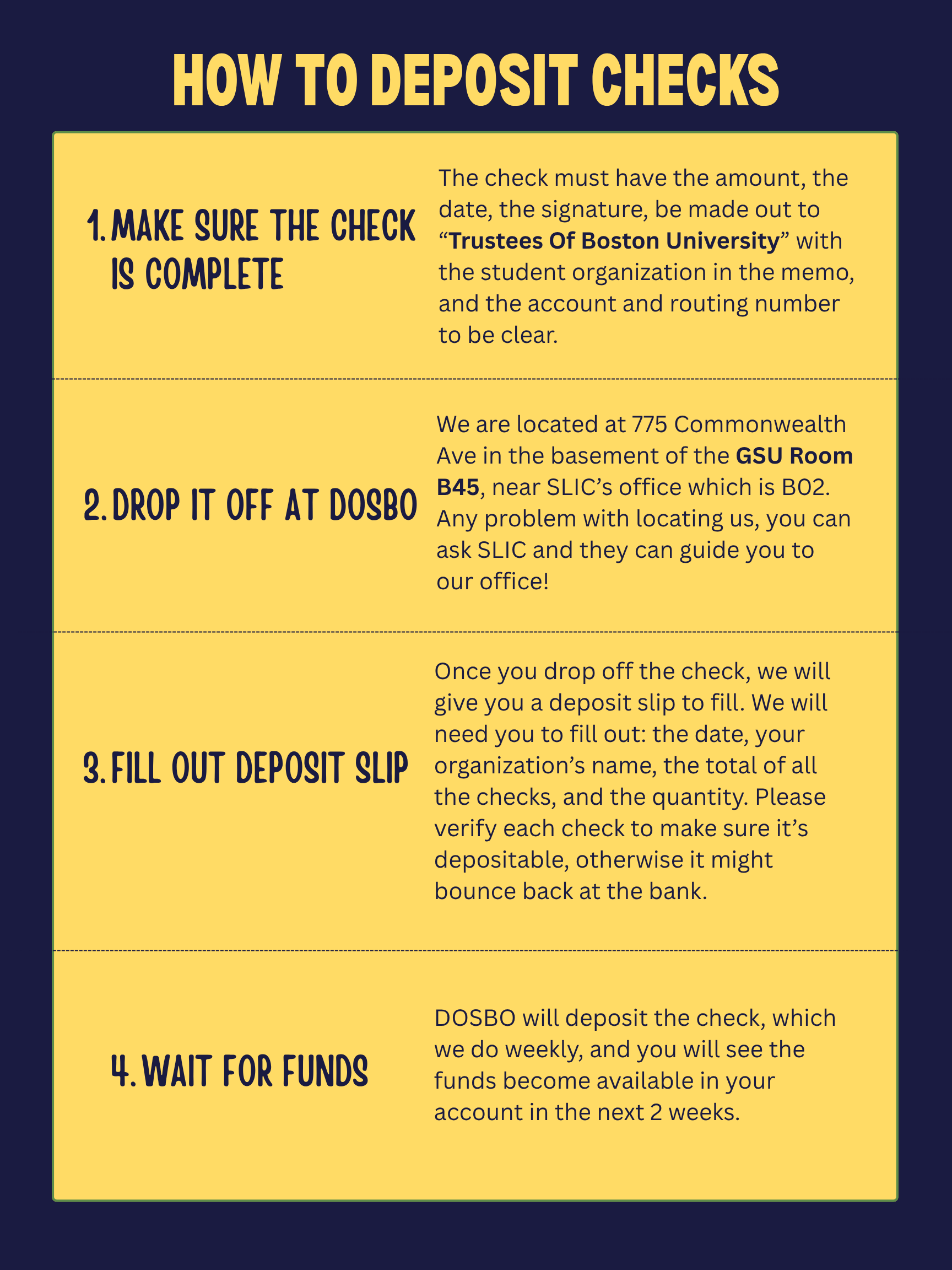
Bring a check to DOSBO and complete a deposit slip. The check must be made payable to Trustees of Boston University. Please note, we can only accept checks with no cash.
Purchase Requests (PR)
When do I submit a PR?
Purchase Request (Purchase requests are submitted via Terrier Central, when groups need to pay vendors or procure goods). This includes supplies, service subscriptions and membership dues.
This is submitted after your Event Request from SLIC has been approved.
What's the timeline?
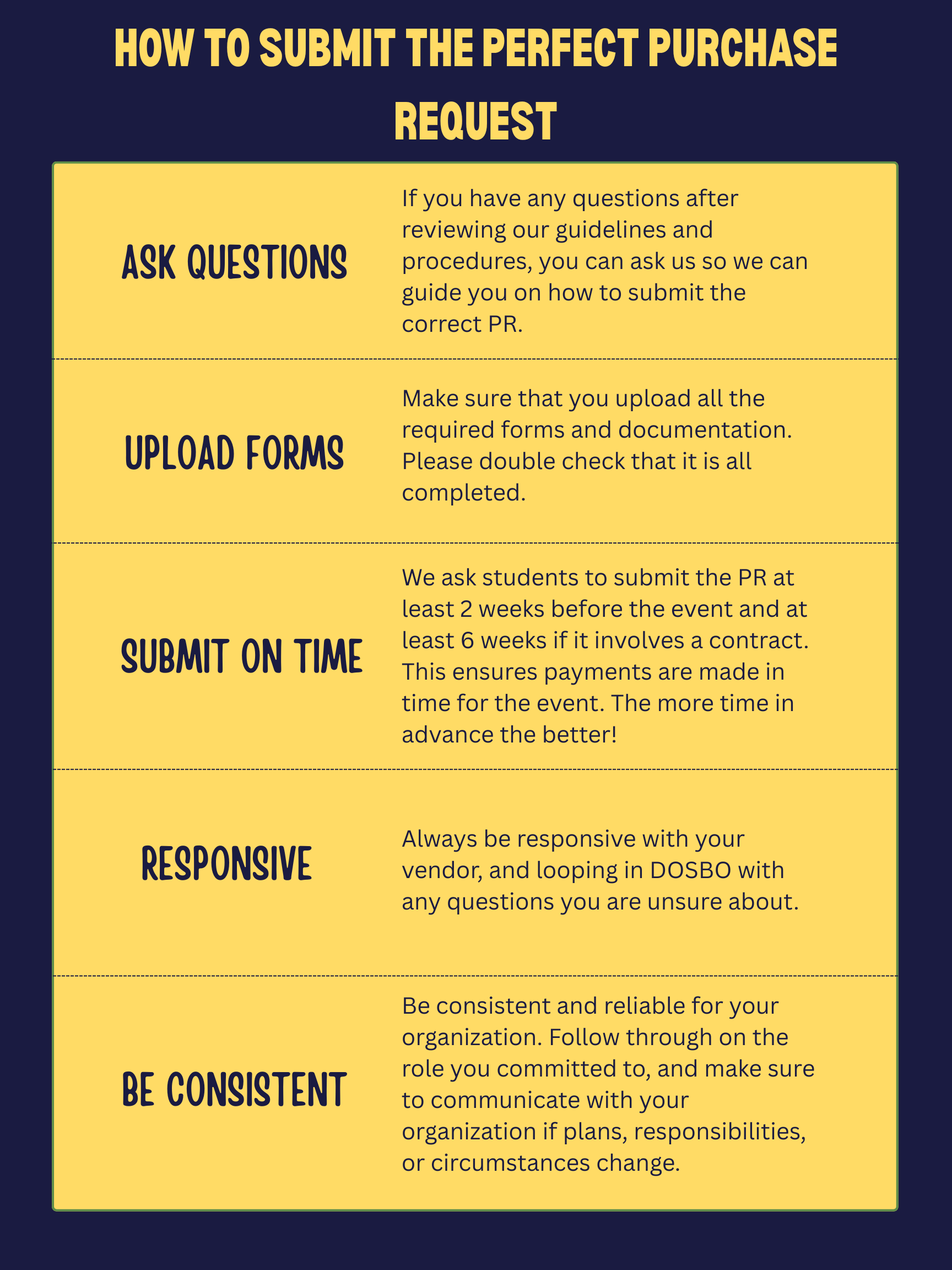
You should submit the PR at least 14 business days ahead of your event. For planning purposes – please remember this is submitted after your Event Request has been approved. So please factor that into your timeline. For a more detailed guide on when certain documents should be submitted for specific requests, refer to the PR timeline page linked under “Helpful Guides”.
How can I expedite my request?
We cannot expedite any purchase requests as this is a first-come first-serve basis. Please plan accordingly, keeping in mind that we need at least 2 weeks to process PR’s depending on demand.
Who can submit a PR?
Only an officer/e-board member of the group is allowed to submit a PR.
What do I need for my PR?
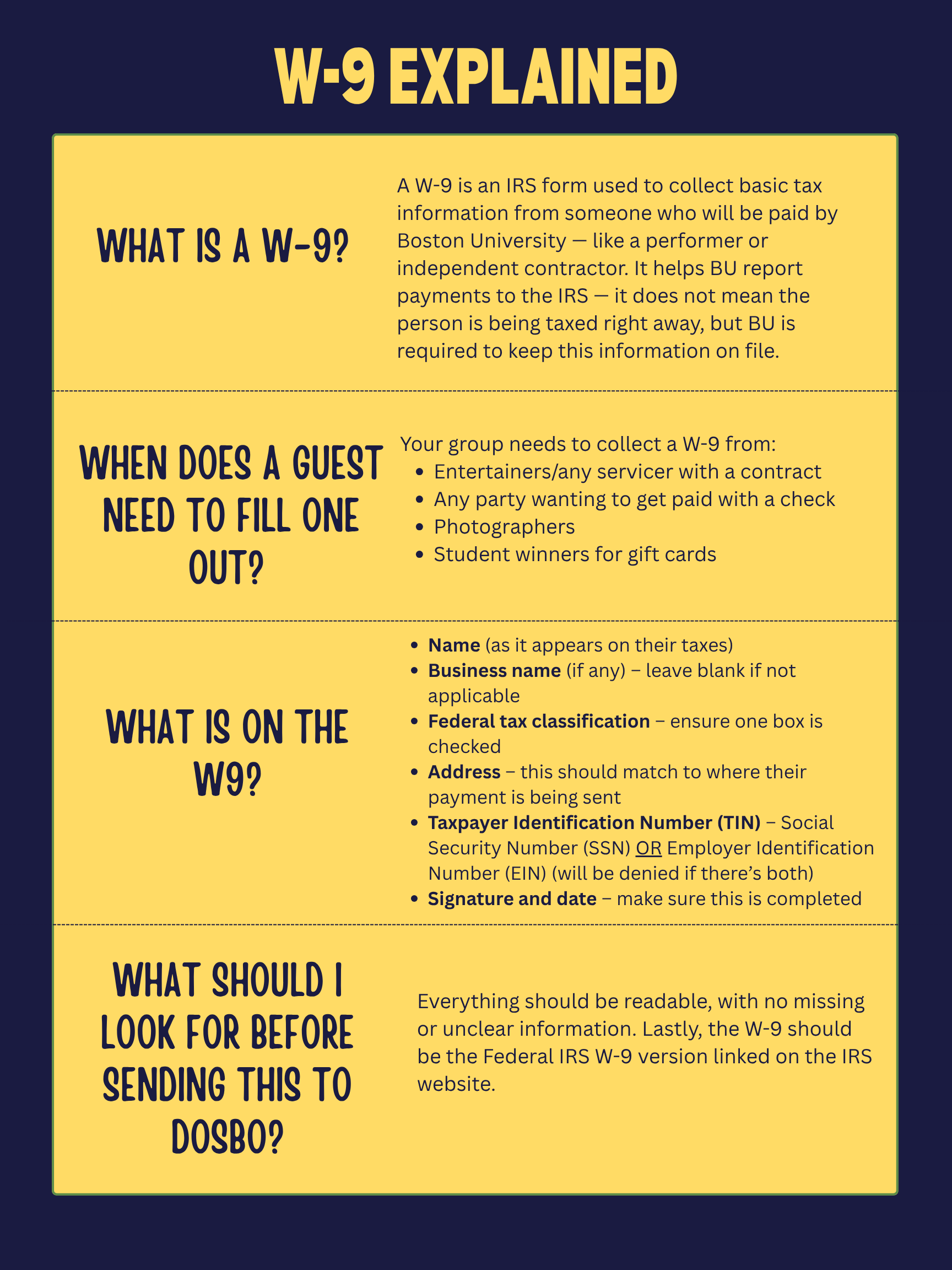
Please see our Payment Procedures chart with tailored directions for each type of purchase. The process of paying a vendor/supplier differs depending on their status and will need specific documentation and information.
How do I title my request?
This is very important – please ensure your subject title is in the correct format:
- For events – Event Name: Event Date: Vendor/Payee’s name
- So that would read – Splash: 09/06/24: Peak
- For general business – General Business: Current Date: Vendor Name
- An example would be: General Business: 10/10/2025: Amazon
- Date format is MM/DD/YYYY
- You need the “:”
If the titles are not in this format, the PR will be denied and need to be resubmitted correctly.
What constitutes an invoice?
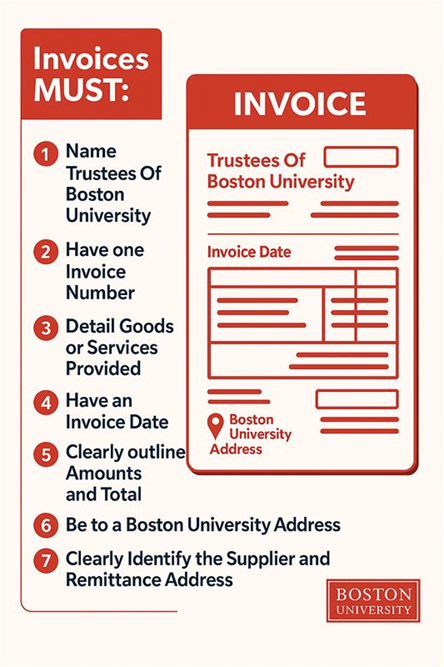
Invoices should include the vendor’s name, vendor address, an invoice number, date, and itemized price breakdown including total amount. Quotes, pro forma invoices, and order confirmations are not accepted as invoices.
How can I pay an individual?
Why is my purchase request denied?
Please see the notes in the comment section of the PR. Once it is denied you will have to make the appropriate changes and resubmit.
What is an honorarium?
An honorarium is a token payment given to a guest speaker, performer, or expert to thank them for sharing their time or expertise — especially when they’re not charging a fee. It’s not a salary or wage, but rather a gesture of appreciation for a guest participating in an event, panel, or activity. This would typically fall under “payment without a contract” on the PR form.
Reimbursements
Can I pay for things out of pocket and get reimbursed?
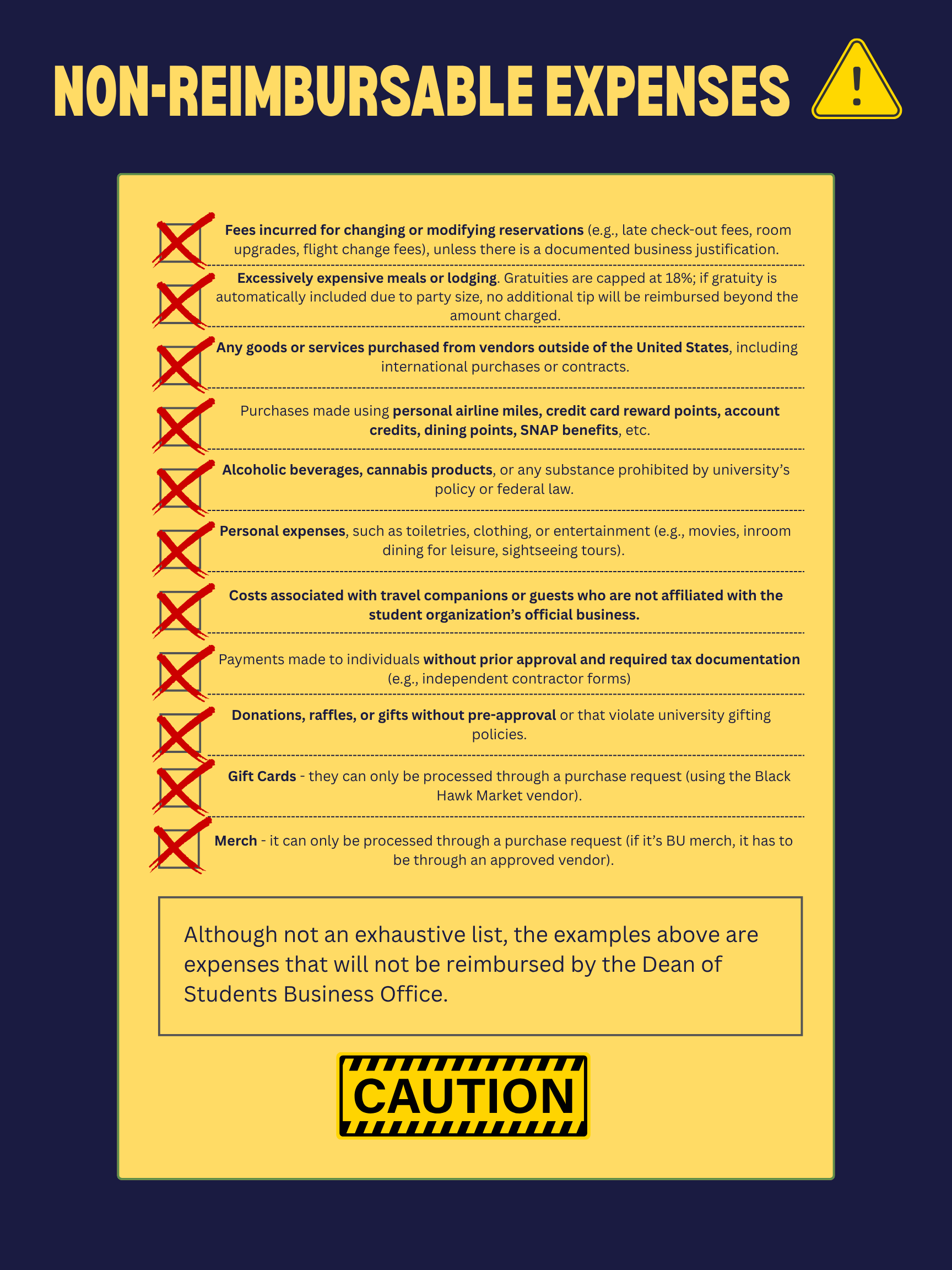
Student organizations are strongly discouraged from paying out of pocket. However, officers may make organization-related purchases and request reimbursement via Terrier Central if they do so within 30 days of the itemized receipt.
How do I request reimbursement?
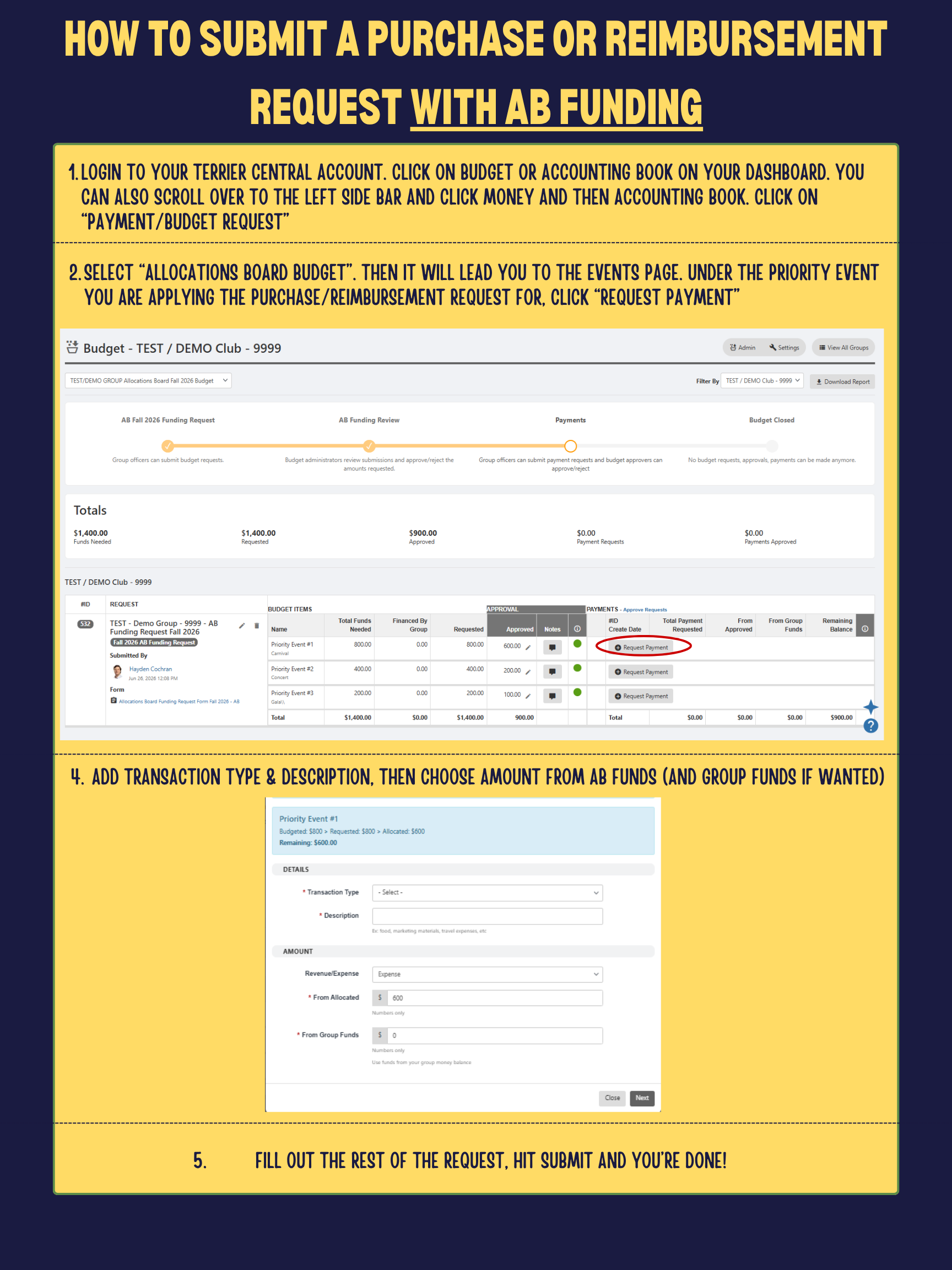
Submit your reimbursement request via Terrier Central (PR/Reimbursement Form), including any itemized receipt(s). Requests must be tied to a registered and approved event in CampusGroups. Note that only officers may submit requests for their group.
When will I be reimbursed?
Once your reimbursement is approved, it may take up to 3 weeks for a check to be produced. Refer to the Check Pickup instructions for how to receive your check.