
On this page you will find instructions on using PyTorch and Tensorflow software via your own installation or SCC modules. RCS does not intend to install newer versions of PyTorch and Tensorflow as modules, so for the latest versions you will need to install them yourself.
PyTorch
Install for Yourself
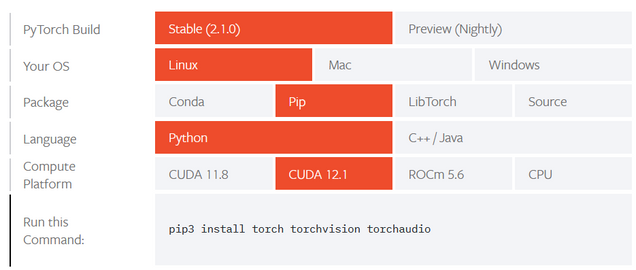
PyTorch is straightforward to install in your own Python virtual environment or conda environment. Be mindful that the PyTorch installation with GPU capabilities is approximately 1GB in size. RCS does not intend to install newer versions of PyTorch within the module system, so a self-install is the way to get access to newer versions of PyTorch. The PyTorch Start Locally page provides instructions on installing PyTorch using the pip and conda tools. It also links to instructions for installing older versions.
Python Virtual Environment
If you are using a Python virtual environment, then select the options “Linux / Pip / Python / CUDA 12.1” to see the appropriate installation command. The resulting installation will run on the GPU compute nodes and make use of the GPU hardware, and will also run on CPU-only nodes. The CUDA drivers on the SCC are kept up to date and the newest available CUDA version should be selected. No additional libraries are needed for CUDA support – everything required is built into the PyTorch installation. If you are interested in installing PyTorch for CPU usage only then select the options accordingly.
Conda Environment
For a conda environment install you can choose either to install via pip (as above) or using conda. For conda, just select the corresponding options on the PyTorch Start Locally page and run the conda command that is displayed.
Using SCC Modules
To see the available versions of PyTorch in the module system run:
module avail pytorchDepending on which one you select you will have to also load a python3 module or activate a conda environment to use these PyTorch installations. The version of Python needs to match the support provided by the module. Loading a pytorch module without having a python3 module or activated conda environment will result in a message like this printing:
$ module load pytorch/1.13.1

-------------------------------------------------------------------------------
WARNING: pytorch/1.13.1 needs to be used with Python 3.7, 3.8, 3.9 or 3.10. This can be provided by a python3 module or via a conda
environment.

For example:

module load python3/3.8.10
module load pytorch/1.13.1

OR:

module load miniconda/4.9.2
conda activate INSERT_YOUR_CONDA_ENV_HERE
module load pytorch/1.13.1

-------------------------------------------------------------------------------
Once an appropriate version of Python is available you can use the PyTorch software normally from Python.
Tensorflow
Install for Yourself
Tensorflow with GPU support has recently become straightforward to install in your own Python virtual environment or conda environment. Be mindful that the Tensorflow installation with GPU capabilities is approximately 1GB in size. RCS does not intend to install newer versions of Tensorflow within the module system, so a self-install is the way to get access to newer versions of Tensorflow.
Python Virtual Environment OR Conda Environment
Regardless of your use of a Python virtual environment or a conda environment you will use the pip tool for the installation. Tensorflow packages for the conda tool do exist but the available versions have tended to lag behind the ones available using pip. Instructions for installations using pip can be found on the Tensorflow site. Activate your virtual or conda environment, and then follow the Tensorflow instructions. For compatibility with GPU nodes and CPU-only compute nodes select the Linux tab and install the tensorflow[and-cuda] package using pip. For a CPU-only installation select the CPU tab and follow the instructions there.

Using SCC Modules
To see the available versions of Tensorflow in the module system run:
module avail tensorflowDepending on which one you select you will have to also load a python3module or activate a conda environment to use these Tensorflow modules. The version of Python needs to match the support provided by the module. Loading a Tensorflow module without having a python3 module or activated conda environment will result in a message similar to the one above for PyTorch modules.