Using WordPress, you can schedule a post or a page to be published in the future. Website editors and administrators can specify a publication time and date, and WordPress will automatically publish the post or page at the time** and date you chose.
**PLEASE NOTE: Scheduled publishing does not always happen at the exact time specified. Scheduled publishing may take up to one hour from the time specified before the page or post publishes. If you need to publish a page/post at an exact time, it is recommend that you publish it manually and do not rely on the scheduling feature.
- Create a new page or post in WordPress and populate it with the content you wish to publish.
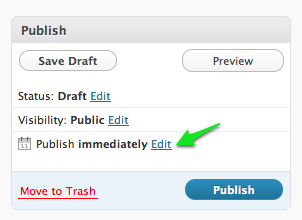
- In the Publish box in the right sidebar of WordPress, look for the calendar icon and click the Edit link next to where it says Publish immediately.
- Specify the month, date, year, and time (24-hour clock) you want the content to be published.
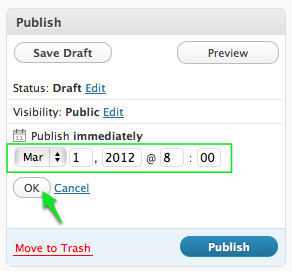
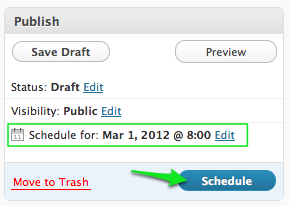
- Click the OK button. WordPress will now indicate the date and time the content is scheduled to be published.
- Click the Schedule button, which is what Publish will switch to after you have chosen a date and time.