
Safe Redirect Manager is a plugin predominantly used for redirecting old/outdated URLs to new pages, or for creating easy-to-remember links that redirect to longer URLs. Safe Redirect Manager is also used in conjunction with BU network-level website routing to redirect URLs for sites that re-launch at new web addresses.
This plugin does not work for files uploaded to your WordPress Media Library, so you cannot create redirects for images, uploaded PDFs, and the like. This plugin also cannot be used for top-level bu.edu redirects (for example: www.bu.edu/myevent/); those require you to submit a request to IS&T for a "Marketing URL."
First ensure Safe Redirect Manager plugin is enabled on your site. Log into your WordPress dashboard and look under the Tools menu for Safe Redirect Manager. If you don't see that, submit a ticket to request the plugin for your site.
Creating a Simple Redirect
- From your WordPress dashboard go to Tools > Safe Redirect Manager
- Click “Create Redirect Rule”
- “Redirect From” is the old URL (or the easy-to-remember keyword/phrase you want to use as a quick link)
IMPORTANT NOTE:
"Redirect From" path should be relative to the root of your WordPress site -- that means remove your home page's URL from the beginning of this path.
For instance if the old page URL is https://www.bu.edu/terrierlab/about-us/director/2020-plan/
Your “Redirect From” path is simply /about-us/director/2020-plan/ - "Redirect To" is the full URL of the web page where you want your visitors to land
- Click “Publish” - your redirect is now live
- Remember to test it to make sure it's working as intended before you share it.
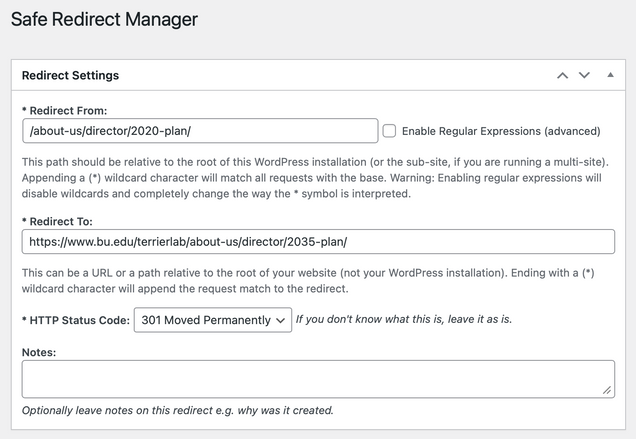
Example: Old page to new page redirect
In this example:
https://www.bu.edu/terrierlab/about-us/director/2020-plan/ would redirect to
https://www.bu.edu/terrierlab/about-us/director/2035-plan/
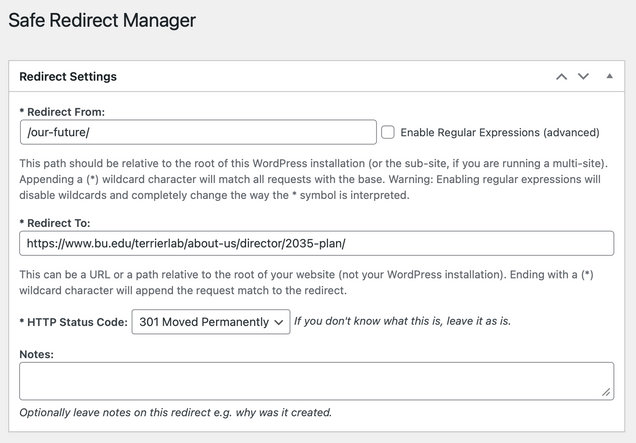
Example: Quick link redirecting to a longer URL
In this example:
https://www.bu.edu/terrierlab/our-future/ (a non-existent page) would redirect to
https://www.bu.edu/terrierlab/about-us/director/2035-plan/
Safe Redirect Manager and BU Web Routing
Safe Redirect Manager can be used in conjunction with network-level BU web routing software. This can happen when sites are re-launched, re-branded at different URLs, multiple sites are consolidated into one site, and similar situations. These situations typically follow one of these three patterns:
1) Simple catch-all redirects: incoming requests for all of the site's old URLs are all redirected to the home page of the new site (example: www.bu.edu/old-site/anything/else/here/ would redirect to www.bu.edu/new-site/).
-- This pattern does NOT use Safe Redirect Manager, and is a simple request ticket to IS&T for a catch-all redirect.
2) Corresponding path redirects: incoming requests for all the site's old URLs are redirected to the corresponding URL path of the renamed site (examples: www.bu.edu/old-site/specific/page/here/ would redirect to www.bu.edu/new-site/specific/page/here/, www.bu.edu/old-site/a/different/page/ would redirect to www.bu.edu/new-site/a/different/page/, and so forth).
-- This pattern does NOT use Safe Redirect Manager, and is a request ticket to IS&T for a redirect that forwards the corresponding URL path.
3) Targeted, complex, or mixed redirects: incoming requests for the site's old URLs are redirected to new/different URLs on the renamed site (example: www.bu.edu/old-site/some/specific/page/ would redirect to www.bu.edu/new-site/revised-page/).
-- This pattern requires changes to the web routing software PLUS setup of Safe Redirect Manager rules on the new site. The rules can then contain any combination of simple to complex redirects.
Post Attributes: Order
The interface for Safe Redirect Manager includes a Post Attributes settings box for each rule to set an "Order" for the rule.

Post order allows you to define an hierarchy in your redirect rules. For practical purposes, this is only important when you are using a combination of redirects both with and without wildcards.
- Post order should be 0 (zero) for specific redirect rules (no wildcard used).
- Post order should be 1 (one) for redirect rules that include a wildcard.
HTTP Status Code
Safe Redirect Manager sends a status code to the requesting browser/agent when a redirect rule is invoked. In most cases you can simply leave this setting as-is; you will almost always use either 301 or 302.
What the status codes mean