COM recommends every student have access to a laptop capable of running the applications used in classes. Unless otherwise noted, all applications used in the College can be installed on both Macs and PCs and are available to students without cost. We do not recommend one platform over another, however, the majority of COM’s public computers are Macs. Generally speaking, any laptop purchased in 2017 or later is suitable or can be upgraded for a minimal cost.
Personal Hard Drives Are Required for Classes at COM
Although ownership of a laptop is not required to complete your degree at COM, owning a personal hard drive is necessary for file management. Cloud storage is not an acceptable alternative. See the page on Personal Hard Drives for more details.
Minimum Laptop Specifications:
- Windows 10/11 or Mac OS Monterey (Version 12 or Later)
- Intel 11th Gen/Apple M1 or newer processors
- 13″+ Screen with 1920 x 1080 Resolution or higher
- 100GB+ unused disk space available for applications and basic media
- Additional free space for media (video, images, etc) and an external hard drive (see below)
- 16GB+ of RAM
- USB A or USB-C Ports
For classes which are video or effects intensive (primarily advanced Film & TV courses) we recommend laptops with a screen resolution of 2560 x 1600 (“Retina Display”) and up to 32GB+ of Ram. Students may find 15″ screens preferable for these classes. See Adobe’s recommended specifications for Premiere Pro usage and other applications here.
New Computer Purchases
If a new computer is needed, we recommend the systems available through BU’s Personal Computer Purchase program. These systems are fully supported by the BU IT Help Center and most are suitable for COM classes. Refer to our minimum laptop specifications listed above.
Required Software
Unless otherwise noted, applications needed for COM are either free to download or Boston University offers a no-cost license to students enrolled in COM degree programs.
Please see the Software Download page for more details.
External Media Storage
- SD Cards: Most COM cameras and audio recorders require a student-provided SD Memory Card.
- For Audio: 16GB-32GB, SDXC. Any card larger than 32GB will not work with most audio devices.
- For Video/Photo: 128 GB+, SDXC, and V60 or V90 speed class. See the figure below for how to read an SD card to make sure it will work with our devices.
- USB Key: An inexpensive USB key/stick will allow students to move files quickly between computers. Note: These cannot take the place of an external drive for classes which require one.
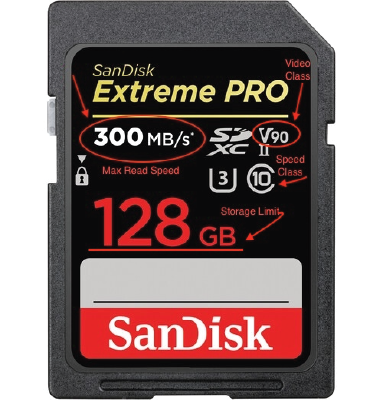
SD Cards will house all their necessary information about specifications on the front of the card along with brand info. The image to the left has all of the relevant information labeled for your convenience and is an example of the minimum specs required to record video in 4k.