COM recommends that every student have a laptop that can run the applications used in their classes. You don’t need a laptop to complete a COM degree (see Loaner Laptops and Adapters and Laptop FAQs), but most students find one essential.
All applications used in COM classes run on both Mac and Windows. Unless a course says otherwise, they are free to students (see Software Downloads). We don’t recommend one platform over the other, but most of COM’s public computers are Macs.
Minimum Specifications
All laptops:
- Memory (RAM): 8 GB minimum; 16 GB recommended (needed for video editing)
- Screen: 13″ or larger, 1920 × 1080 or higher
- Storage: 100 GB or more free for applications, plus an external drive for media
- Ports: USB-C or USB-A (bring adapters for HDMI; see Loaner Laptops and Adapters)
Mac:
- Operating system: macOS 15 Sequoia or later
- Processor: Apple silicon (M1 or newer) recommended. An Intel Mac that runs macOS 15 works for most classes, but can’t run current Adobe video apps such as Premiere.
Windows:
- Operating system: Windows 11, version 24H2 or later
- Processor: Intel Core 11th Gen or newer, or AMD Ryzen 3000 series or newer
- Graphics: 4 GB of GPU memory or more
Most laptops bought new in 2021 or later meet these specs. If you’re not sure about yours, contact us.
For Video Editing Classes
If your classes use Adobe Premiere or other video editing apps, you need:
- Mac: Apple silicon (M1 or newer). Intel Macs can’t run current Premiere.
- Memory: 16 GB of RAM or more.
For advanced Film & TV and effects-heavy courses, we also recommend:
- Memory: 32 GB of RAM or more for 4K work.
- Mac processor: an M-series Pro, Max or Ultra chip.
- Windows graphics: 8 GB of GPU memory.
- Screen: 2560 × 1600 or higher. Many students prefer a 15″ or 16″ screen.
See Adobe’s Premiere technical requirements for full details.
Buying a New Computer
If you need a new computer, we recommend the systems sold through BU’s Personal Technology Purchases program. The BU IT Help Center fully supports these systems. Check any model against the minimum specifications above before you buy.
Required Software
Unless otherwise noted, applications used in COM are either free to download or licensed by Boston University at no cost to students in COM degree programs. See Software Downloads for details.
External Media Storage
- External hard drive (required): every COM major needs a personal external SSD of at least 1 TB. Cloud storage doesn’t replace it. Film and documentary students should have 4 TB or more. See External Hard Drives for requirements and how to format your drive.
- SD cards: most COM cameras and audio recorders need a student-provided SD card.
- Audio: 16–32 GB SDXC. Cards larger than 32 GB won’t work in most of our audio recorders.
- Video and photo: 128 GB or more, SDXC, speed class V60 or V90.
- The figure below shows how to read an SD card’s label to check that it will work with our equipment.
- USB key: an inexpensive USB stick is handy for moving files between computers. It can’t replace an external drive for classes that require one.
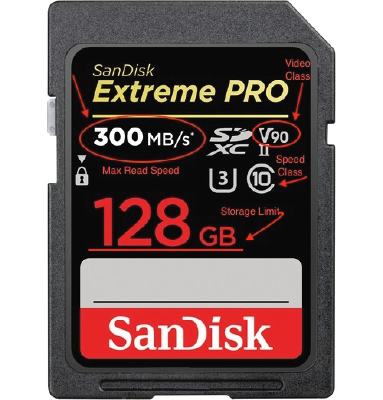
SD Cards will house all their necessary information about specifications on the front of the card along with brand info. The image to the left has all of the relevant information labeled for your convenience and is an example of the minimum specs required to record video in 4k.